Shredding tLab and its subsequent customization
Created by: Kim Konstantin, Chief Technical Officer
tLab Technologies, 2024
Astana 2024
How to clean:
1. Stop all services
2. Rebuild the tlab-dev-2 base
drop database `tlab-dev-2`;
create database tlab-dev-2 default character set 'utf8';
grant all privileges on tlab-dev-2.* to tlab@localhost;
flush privileges;
3. Rebuild the tsoc database
create database tsoc default character set 'utf8';
grant all privileges on tsoc.* to tlab@localhost;
flush privileges;
3. Rebuild the tmail database
create database tmail default character set 'utf8';
grant all privileges on tmail.* to tlab@localhost;
flush privileges;
4. Re-create the nss database???
similarly
create database network-storage-scanner default character set 'utf8';
4. Run the shred script
sh /usr/local/tlab/misc/scripts/reset/delete_all_data.sh`
5. migrate tmail
cd /usr/local/tlab/tlab-smtp-server/
./vsmtp/bin/python manage.py migrate
7. Start all services
8. Execute scripts to create admin and other primary data
mysql tsoc < /usr/local/tlab/misc/scripts/sql/create_tsocuser_tnt.sql
mysql tsoc < /usr/local/tlab/misc/scripts/sql/create_tsocuser_admin.sql
mysql tlab-dev-2 < /usr/local/tlab/misc/scripts/sql/uas_scripts.sql
cd /usr/local/tlab/tlab-smtp/server
./vsmtp/bin/python/ manage.py createsuperuser (admin, info@tlab.kz, admin, y)
9. create a mailer preset
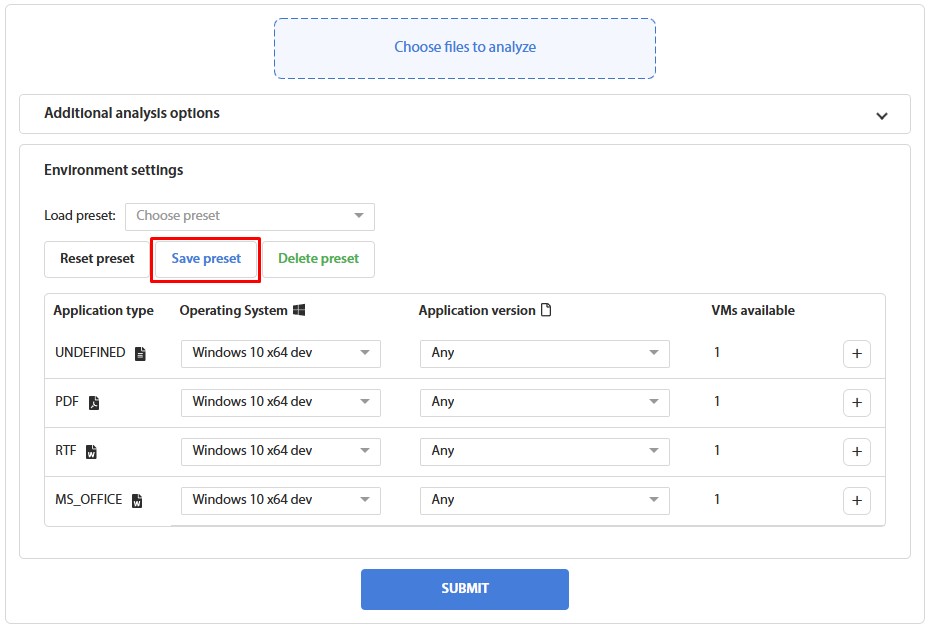
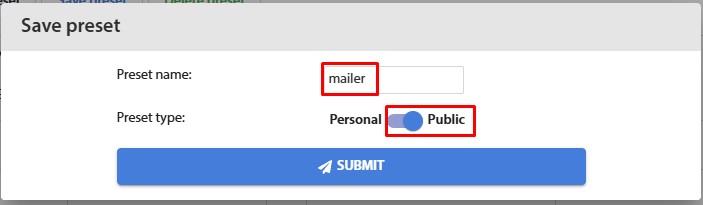
11. Check that the file is being analyzed
12. check that a report is being sent to tsoc